YES24 Global Ticket Login and Verification Pending: Passport Name Rules (2026)

For YES24 Global Ticket, sign up separately from any YES24 shop account. If your show is Verified Member Only, verify that ticket account with your physical foreign passport and a face photo one to two days before sales. Type your name exactly as the passport prints it. A fan-club presale can add a separate membership verification.
Checked against the YES24 Global Ticket FAQ and official event notices on 21 October 2026; the overseas Korean-national exception was checked on 6 November 2026 (KST). This is a preparation guide, not a ticket offer.
YES24 Global Ticket login not working? Check which account
Start by checking which account you are using. YES24 says its Global Ticket service needs a separate signup from an existing YES24 account, including the global.yes24.com shop account. An email and password that work in the shop may not exist in the ticket system at all. [1]
Start at YES24 Global Ticket or the Global booking link in your artist's official notice. Before you register, put your passport beside the screen and compare each field with the document rather than copying your social-media name. Keep a private note of which ticket account and email you used, because verification later binds to that exact email.
What does Verified Member Only mean on YES24?
It is account identity verification, required for selected shows. The standard route uses a physical foreign passport and a face photo. In My Info, look for Verify Account and Pre-Verification; YES24 recommends finishing 1 to 2 days before sales. Afterwards, check that the account says Verified. [1]
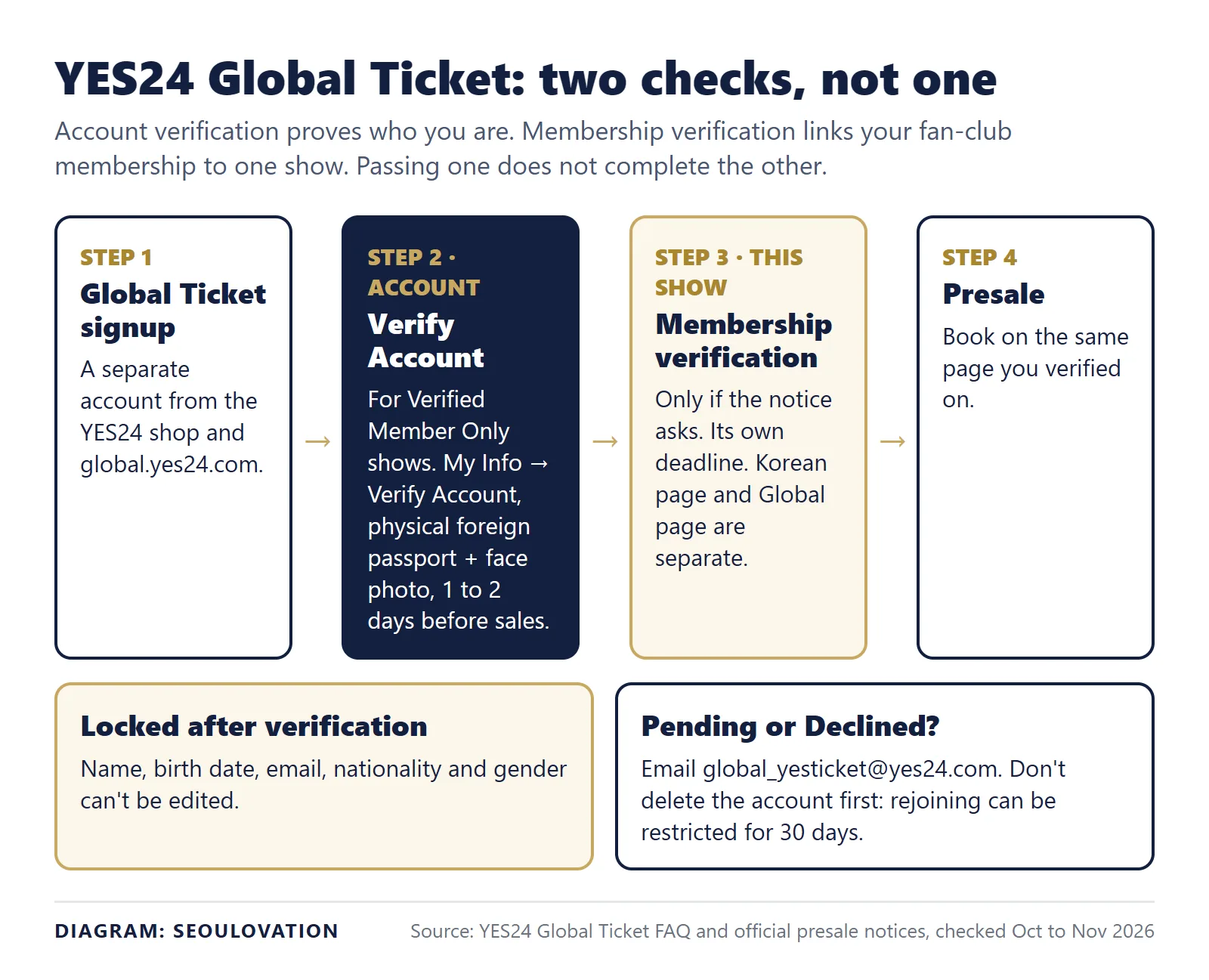
Two warnings from the FAQ matter more than they look. Name, birth date, email, nationality and gender cannot be edited after verification, so a typo becomes permanent. And a presale countdown is not a verification deadline: set aside a separate session before ticketing, with the passport and your registered email open.
Korean national living overseas? YES24 has a separate support-assisted route; the standard foreign-passport process is not for every Korean passport holder. Contact the official Customer Center first to confirm your overseas residence with the residence-country ID it asks for. After approval, YES24 sends a dedicated verification URL to your registered email. Complete verification with your Korean passport within 3 days of receiving that URL, using the exact email on your Global Ticket account. The FAQ warns that verification without prior support consultation will not update member information. See the official FAQ, Verified Member question 10.
Send identity documents only through the official support process, never in this blog's comments or to Seoulovation.
If YES24 verification is Pending or Declined
Verified, but the button still does not say Booking?
After completing identity verification, refresh the show's booking page. YES24's official FAQ, reread on 16 November 2026, distinguishes two button states: before the sale opens it may show Verified Member; after the sale opens it changes to Booking. A verified status therefore does not mean tickets are already on sale. Check the opening time in Korea time before treating the button as an error.
If the verification status itself remains Pending or Declined, use the support route below. Keep those identity-review states separate from a sale that has not opened yet.
YES24 directs both statuses to customer support; you cannot retry them yourself. The FAQ also tells users to ask support before withdrawing an account to move verification elsewhere, and warns of a 30-day restriction on rejoining or authenticating if you skip that inquiry. Deleting the account in frustration is the one move that makes things slower. [1]
The official FAQ gives one contact for both statuses: email global_yesticket@yes24.com (checked 12 November 2026). Send it from the email address on your Global Ticket account and include:
- Your Global Ticket ID and the name exactly as typed in the account
- The status you see (Pending or Declined) and when you submitted verification
- The show name, date and the sale or presale time you are aiming for
- Your nationality and that you used a physical foreign passport
Ask for the correction or the next step. If the sale is close, say so, but plan as if support may not answer before the queue opens.
Fan-club membership verification is a separate step
A fan-club presale often stacks three actions, and finishing one does not finish the next. In a January 2026 presale notice for CUTIE STREET, fans had to apply on Weverse, complete YES24 account verification, and then complete YES24 membership verification before entering the presale. The Weverse application closed before sales opened, while membership verification stayed open into part of the presale. [2]
The same notice set two rules worth checking in your own show's notice. Verification on the Korean page applied to the Korean presale and verification on the Global page to the Global presale, so verify where you will buy. Deleting and recreating the ticket account did not reset that show's membership verification.
| Step | Where it happens | Write down from your notice |
|---|---|---|
| Fan-club application | Usually Weverse or the artist's fan-club page | Closing date and time, in KST |
| Account verification | YES24 Global Ticket, My Info | Done? Account shows Verified |
| Membership verification | YES24, Korean or Global page as the notice says | Its own closing time, which can differ from the sale |
| Presale | The page you verified on | Opening time and ticket limit |
A membership purchase receipt alone does not show that you finished the later application or ticket-site step.
Passport names, middle names and spaces
Use your passport details consistently. A Jeong Sewoon concert notice told Global buyers to book under their passport name. A KARINA event notice went further for membership verification: name and membership number had to match the fan-club record, including letter case and spacing. [3] [4]
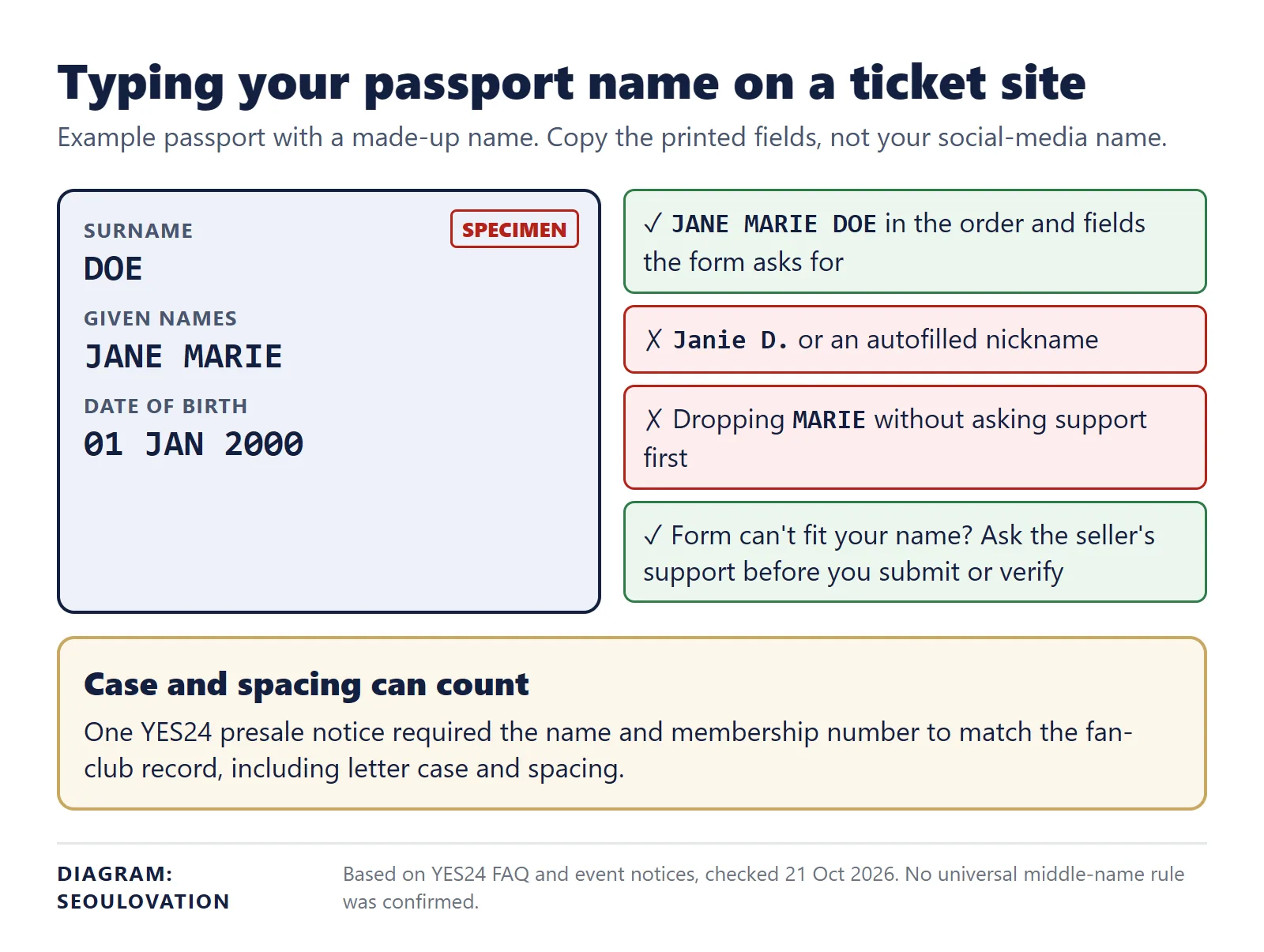
That second rule belongs to that event. It does not set a universal YES24 rule for middle names, accents or name order, and we could not confirm a blanket exception for omitted middle names. If the form cannot represent your passport name, ask support how to enter it before you submit or verify, since verified details cannot be edited afterwards.
Ticket pickup can involve another identity check
Verification online does not end the ID checks. The Jeong Sewoon notice made Global purchases on-site pickup only and required booking confirmation and identification at the box office. For AKMU's Gangneung show, the presale notice required the membership holder, ticket buyer and attendee to be the same person, even when a family member's account was involved. It listed an original photo ID, reservation confirmation and mobile Weverse Membership Card for the day-of-show check. [3] [5]

Use those notices as a reminder to read your own event's pickup hours, accepted ID and membership requirements. Bring the documents named there, as originals. Another fan's easy entry at another show tells you nothing about yours.
Can a friend collect my YES24 presale ticket?
Do not plan on proxy pickup unless your show's notice allows it. The AKMU notice tied the presale purchase to the attendee's identity and required the membership to stay valid through the performance. [5]
Before sale day, finish this sentence for your own booking: "My ticket account is ___, my required verification steps are ___, and my event's pickup documents are ___." Keep that note private and open it when you return to the booking page.
What to do next
- Log in to the Global Ticket account, not the shop account, and check for Verified.
- List every verification step and deadline from your show's notice.
- Ask support about any name the form cannot hold, before you verify.
Related guides
- How to buy K-pop concert tickets in Korea as a foreigner
- Naver passport verification for foreigners
- Interpark (NOL) cancelled ticket release: when sold-out seats come back
Sources and checked date
Event-specific instructions are attributed to the named show rather than applied to every YES24 booking. The past events named here are examples of how rules differ; their sale dates are not upcoming deadlines.
- YES24 Global Ticket FAQ: accounts, Verified Member and pickup (checked 21 October 2026; Verified Member question 10 checked 6 November 2026; support email checked 12 November 2026).
- KAWAII LAB. official notice: CUTIE STREET Live in Korea 2026 (checked 21 October 2026).
- YES24: 2026 Jeong Sewoon Concert Margins ticket notice (checked 21 October 2026).
- YES24: 2026 KARINA B-day PARTY MEMORY BOX ticket notice (checked 21 October 2026).
- YES24: AKMU 2026 Gangneung concert ticket notice (checked 21 October 2026).
Update log: 12 November 2026, added a login section and two diagrams, and replaced a past presale date table with a checklist for any show. 6 November 2026: added the overseas Korean-national verification exception. Later on 12 November: limited the passport step to Verified Member Only shows and added the support email from the FAQ.
Update, 16 November 2026: Added the official distinction between the Verified Member and Booking buttons so a future sale is not mistaken for failed identity verification.
Cover photo: Porapak Apichodilok on Pexels; cropped (Pexels License)


Comments
Post a Comment