Naver Passport Verification for Foreigners: Why It Fails and How to Fix It (2026)

Naver passport verification lets foreigners without a Korean phone number confirm their identity with a passport, mainly for Naver Map reservations, orders and payments. When it fails, Naver's help pages point to its four passport rules, camera or lighting, and a name or birth date that differs from your account. A Korean tourist eSIM number does not replace it.
Passport and failure checks reread against Naver's passport-verification help on 16 November 2026. The older document-review route was checked separately. We have not submitted a passport ourselves; the steps below distinguish Naver's published guidance from our troubleshooting suggestions.
What does Naver passport verification unlock?
Naver's help page says foreigners who use reservation or ordering services can verify with a passport during that flow. Naver's press release of 9 June 2026 names Naver Map reservations, orders and payments, and says you need neither a Korean number nor a support ticket, only a smartphone. The service opened on 4 June 2026.
That covers what K-pop travelers book through Naver Map: a restaurant near the venue, a hair or makeup slot before a concert, or a pop-up or exhibition that takes Naver reservations.
It is not a key to all of Naver. Some English videos describe it as full access to every Naver function, which Naver's documents do not say. Etnews reported that Naver plans to extend it to Naver Pay, Naver Webtoon and Chzzk, with no date. Naver Cafe fan cafes and Smart Store are not mentioned anywhere we looked.
The four passport rules, in Naver's words
The Korean help page accepts a passport only if all four of these are true:
- Issued outside Korea. 대한민국 외 국가에서 발급한 여권: a passport from any country other than South Korea.
- Not used on another Naver ID. 다른 아이디에서 인증하지 않은 여권. One passport cannot verify a second account.
- Not expired. The page gives no minimum remaining validity, so "6 months left" is not a stated requirement.
- Name and date of birth match your sign-up details. They must match what you entered when you created the Naver account.
You need the physical passport. The app photographs it live through the camera, then runs a face check against the passport photo. Naver asks you to lay the passport flat, avoid glare, use bright light, keep your whole face in the frame and follow the on-screen movements.
How to do Naver passport verification: where is the button?
Naver's help page places passport verification within a reservation or ordering flow. It does not give a universal button path for every screen. Open the service you actually want to book and look for its identity-verification step. We could not independently confirm the menu-by-menu route previously described here, so we do not present it as an official route.
Switching Naver Map to English is official. Naver's Map help page gives the path: on Android, MY (profile icon), then the gear icon, then Language; on iOS, the phone's Settings, then NAVER Map, then Preferred Language. It needs Map app version 5.1.3 or later. We found no official way to switch the main Naver app to English.
Why does Naver passport verification fail?
What Naver's help page asks you to check
- Camera access not allowed for the app.
- A dark room, which the page says can make recognition fail, or glare on the passport.
- Face not fully inside the frame during the face check.
- A passport that breaks one of the four rules: Korean-issued, already used on another ID, expired, or a name and birth date that differ from your account.
If Naver rejects your passport with no reason, or asks for a Korean number
If the screen gives no useful reason, first record which stage failed: finding the passport option, scanning the passport, matching the face, or confirming the account. The table below is our troubleshooting checklist built from Naver's published conditions, not a list of confirmed causes for every error.
| Where you are stuck | Check first | If it still fails |
|---|---|---|
| No passport option in the service | Naver describes the check inside reservation or ordering; a profile-edit screen may be a different process. | Ask Naver support whether passport verification is available in the exact service and screen you are using. |
| Passport or face scan fails | Camera permission, bright even light, no glare, passport laid flat, whole face in frame. | Keep the exact error wording and contact official support rather than guessing a retry limit. |
| Account or passport details do not match | Foreign-issued, unexpired passport, not verified on another ID; account name and date of birth match. | Ask support how to correct the account or resolve the previous verification. Do not create replacement accounts as an assumed fix. |
| A Korean phone-number screen appears | Check whether you opened passport verification, ordinary phone authentication or profile editing. | Send the service name and failed step through Naver's private support route; a tourist eSIM number is not proof of identity. |
Passport verification is not the older ID-upload process. Naver also documents a customer-center route for confirming a legal name; that involves document review and can take time. Do not mix its waiting time with the in-app passport scan. Check the result shown by the service you intended to use; do not pay for an unwanted booking just to test verification.
A short message for official support
You can adapt this: “I am trying to use [reservation or ordering service]. I reached [step] on [device and app version]. The exact error is [text]. I have checked camera permission and whether my account details match my passport. Which verification route should I use, and how can I correct this error?”
This is our suggested message, not a Naver form. Send it only through Naver's official private support channel. Do not post your passport image, document number or account details in blog comments.
Can a Korean eSIM number replace passport verification?
No. A tourist eSIM can get you online and, depending on the plan, give you calls or texts. None of that is identity verification. Your phone can stream a fancam and still fail an identity check, so work out first whether a service wants internet access, a text-message code, or a verified person.
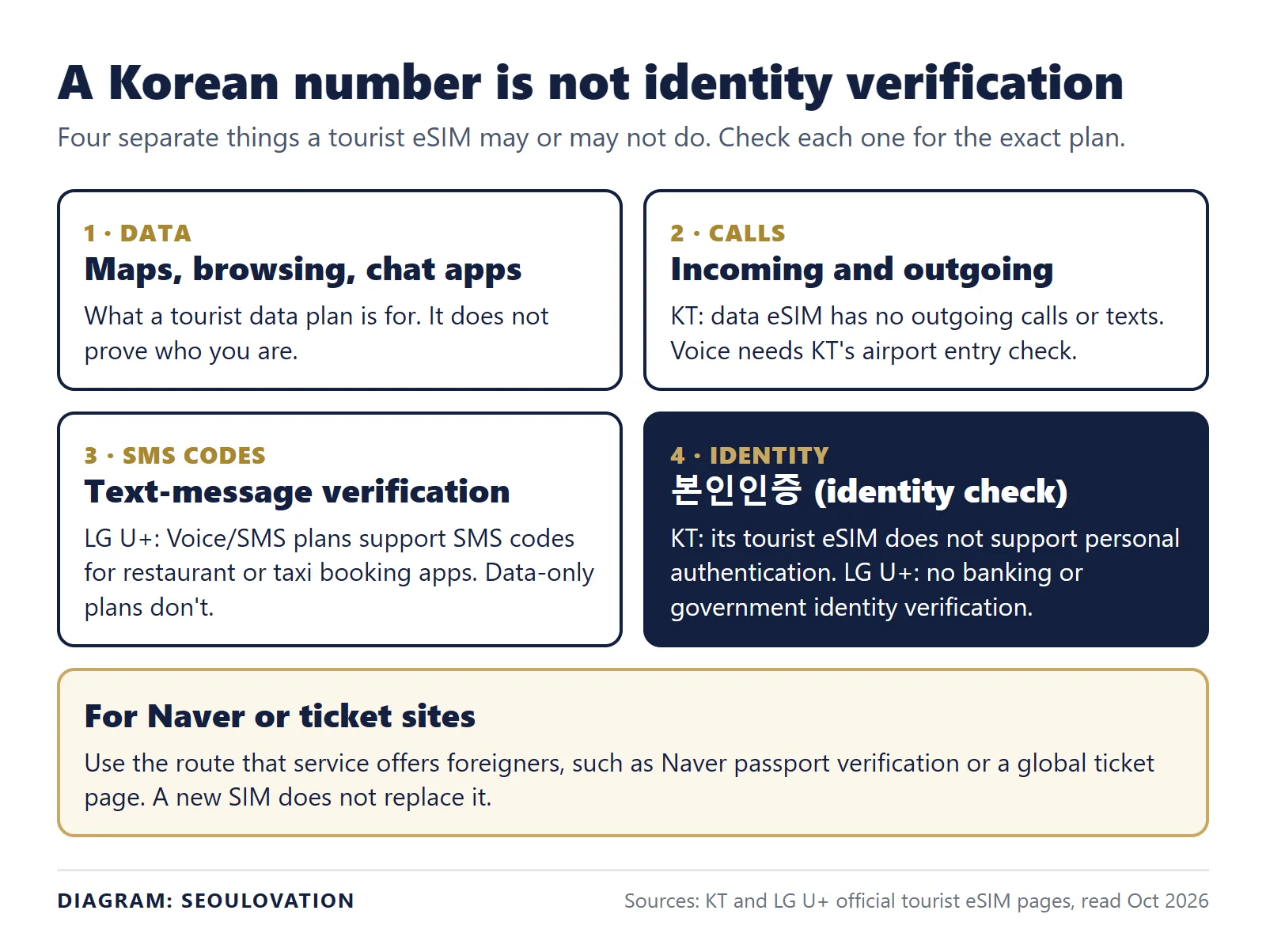
The carriers' own pages say so in plain words. KT's tourist eSIM page says its numbers start with 010, but also that KT eSIM does not support personal authentication. Its data eSIM does not support outgoing calls or texts, and voice and SMS need KT's airport entry-check process. KT calls that process "Identity Verification (Entry Check)", which is about activating the SIM, not a promise that another service will accept it.
LG U+'s eSIM FAQ separates SMS verification for restaurant or taxi booking apps, which its Voice/SMS plans support, from identity verification for banking or government services, which it does not. Data-only plans do not support SMS verification, even though its comparison table lists incoming calls and texts for them. "Can receive a text" and "supports the verification I need" are different claims.
Ask the provider this, with the product name in it: "I'm visiting Korea and need to use [app or website]. Does this exact plan support its SMS verification, or does that service need identity verification this plan cannot provide? What activation steps are required?" Then check the app's own help page too, because a carrier cannot decide another service's rules.
Can you verify before you land?
Naver does not say. Alchera, the parent of the verification vendor, describes on its case study page a step that checks immigration stay records to confirm the user is in Korea. If that step applies to every attempt, a try from home could fail. That is our inference from a vendor page, not Naver's statement, so the safer plan is to try after you arrive.
Does your booking even need Naver?
Before you spend an evening on this, check the booking channel of the place or event you care about. It is often not Naver. When we checked K-pop pop-ups and exhibitions in October 2026, none used Naver reservations: one took advance bookings on Weverse and another sold tickets on Melon Ticket. Concert tickets go through ticket sites with their own passport checks, covered in our guide to buying K-pop tickets as a foreigner.
The same check applies to the restaurant or salon you want: see whether it takes Naver bookings before you spend time on verification.
A checklist before you try
- Check that the name and birth date on your Naver account match your passport. If the birth date is missing, contact Naver's help center first.
- Update Naver Map and set it to English. The 5.1.3 minimum applies to the language setting; we found no minimum version for verification.
- Allow camera access for Naver Map.
- Open a booking in Naver Map and look for passport verification in that flow.
- Do it in a bright room with the passport flat on a table, ideally after you have entered Korea.
- Buy your eSIM for data and, if needed, calls or texts. Do not buy a second one hoping it will pass an identity check.
Questions about Naver passport verification
Can I do Naver passport verification without a Korean phone number?
Yes. Naver describes passport verification for foreign users without requiring Korean phone authentication in that flow. If you reach a phone-number screen, ask support whether you are in the correct process; the help page does not diagnose every screen transition.
Can I use the same passport on two Naver accounts?
No. The help page accepts only a passport that has not been verified on another ID.
Does passport verification work for Naver Pay and Naver Cafe?
Naver's documents cover reservations, orders and payments on services such as Naver Map. Etnews reported plans for Naver Pay, Webtoon and Chzzk without dates. Naver Cafe is not mentioned.
What to do next
- Compare your Naver account name and birth date with your passport.
- Set Naver Map to English and allow the camera.
- Try the verification in a real Naver Map booking after you land.
Related guides
- How to buy K-pop concert tickets in Korea as a foreigner
- YES24 Global Ticket: passport name and verification
- Weverse Shop payment failed? PayPal, cards and KRW vs USD prices
Sources
- Naver Help Center 25234 (Korean) and 25235 (English): passport rules and camera guidance. Checked 2026-10-02.
- Naver Help Center 20897: the older ID-copy process. Checked 2026-10-02.
- Naver Help Center 8275: Naver Map language setting. Checked 2026-10-02.
- Naver press release, 9 June 2026. Checked 2026-10-02.
- Etnews, 4 June 2026: planned extension to other Naver services. Checked 2026-10-02.
- Alchera case study: vendor description of the immigration stay check. Checked 2026-10-02.
- KT tourist eSIM conditions and LG U+ eSIM page: data, calls, SMS and authentication support. Checked 12 November 2026.
Update log: 12 November 2026, folded in our former eSIM page ("a Korean number is not identity verification"), added two diagrams, and replaced a dated event list with a check that works for any booking.
Update, 16 November 2026: Removed unrecoverable Reddit/YouTube quotations and their route diagram; added a source-based failure-stage table and a private support-message template; separated in-app passport verification from manual legal-name review.
Cover photo: NAVER Green Factory, Naver's headquarters in Seongnam, March 2019. Photo: Maskkwon, via Wikimedia Commons, resized. (CC BY-SA 4.0)


Comments
Post a Comment