Weverse Shop payment failed? PayPal, cards and KRW vs USD prices
If your Weverse Shop payment failed, check two settings first: which seller handles the item and which currency your shop is set to. Each seller has its own payment list, and the methods change with the currency and the country you pay from. For Weverse Global, PayPal and Eximbay are listed under USD and JPY payments, not under KRW.
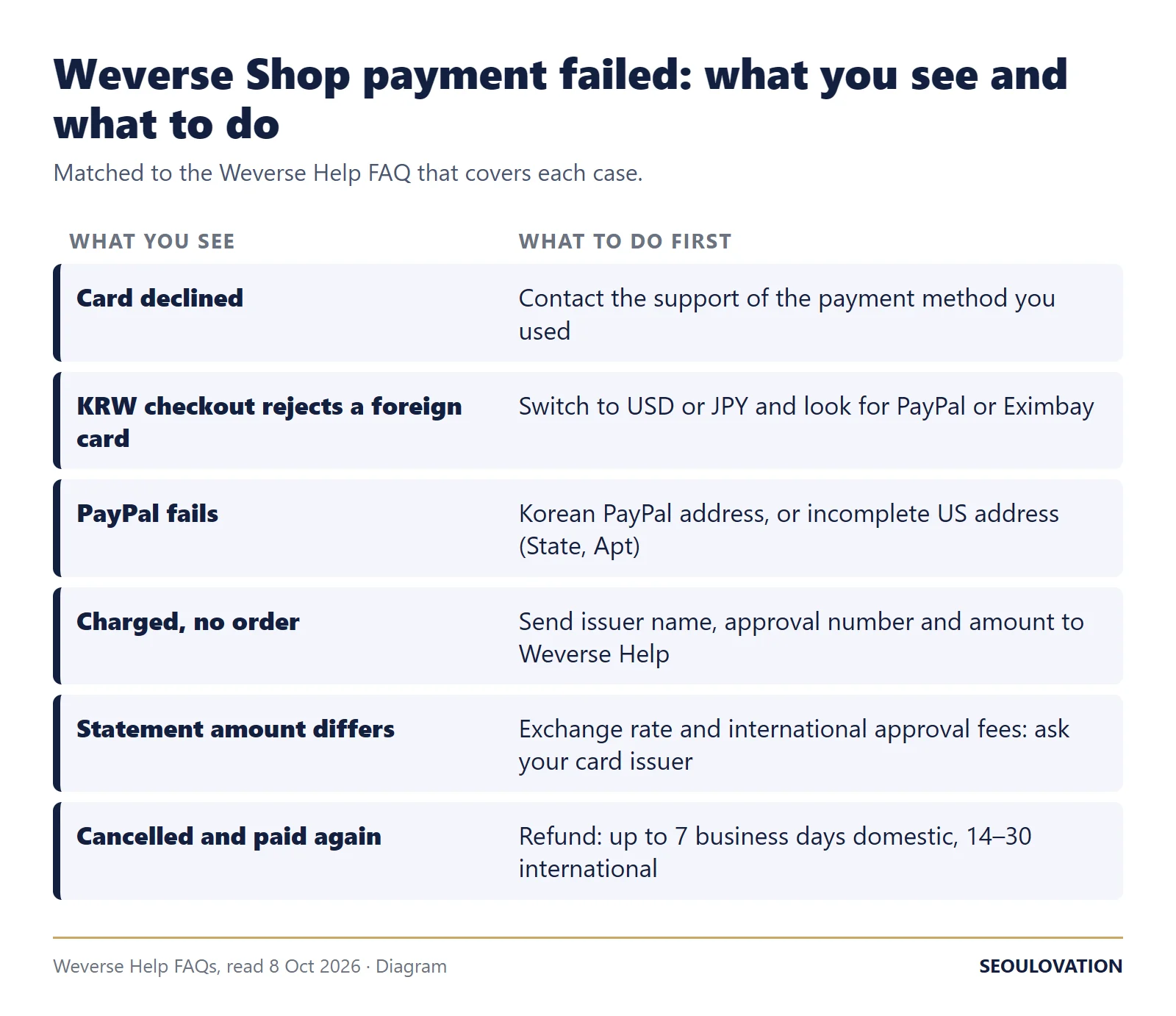
Checked against ten Weverse Help FAQs and five Weverse Global album listings on 8 October 2026. If a charge is still declined after the checks below, Weverse's failed payment FAQ says to contact the customer support of the payment method you used.
Weverse Shop payment failed: a quick checklist
- Read the seller line on the product page. The five listings we checked each said "Weverse Global handles this product."
- Set the shop currency. In the Weverse app: Home, then Shop at the bottom, then Menu at the top right, then Currency. On the website: Currency settings at the top left.
- Compare your Checkout page with the seller table below. Some options only appear in certain countries or regions.
- If a credit card is declined, contact the support of the payment method you used. Weverse's FAQ says that may get you a faster answer.
- If you cancel and pay again, expect the first payment to take a while to come back. For Weverse Global, the refund FAQ lists up to 7 business days for domestic payments and 14 to 30 business days for international payments, and up to 30 days for a card payment made through PayPal, depending on the card issuer.
Weverse Shop payment methods by seller and currency
Payment methods start with the seller. Weverse Global, Weverse Japan and Weverse America each keep their own list. The table copies the payment options FAQ and the currency FAQ as they read on 8 October 2026.
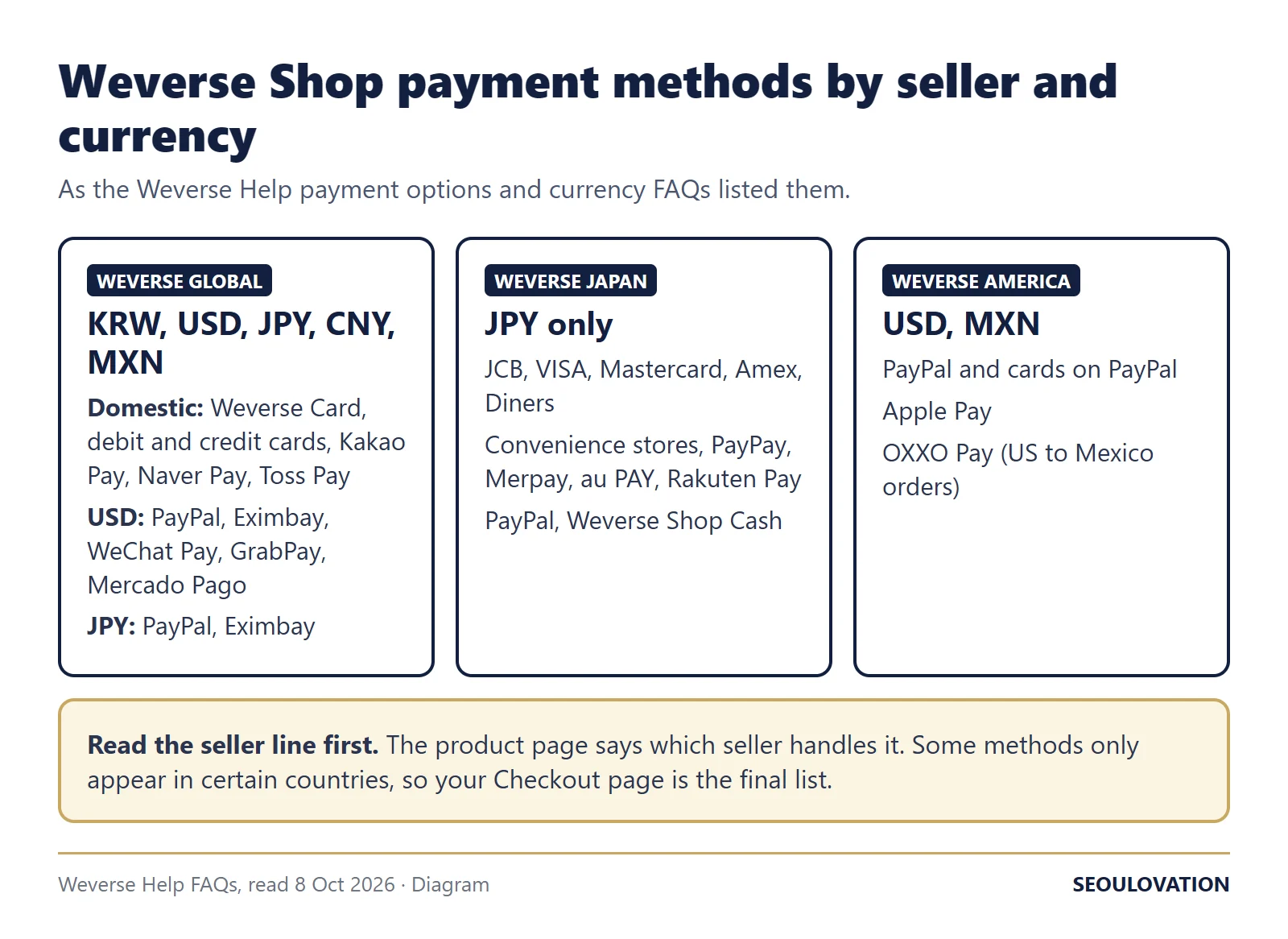
| Seller | Currencies | Payment methods the FAQ lists |
|---|---|---|
| Weverse Global | KRW, USD, JPY, CNY, MXN | Domestic: Weverse Card, debit and credit cards, Kakao Pay, Naver Pay, Toss Pay. USD: PayPal, Eximbay, WeChat Pay, GrabPay, Mercado Pago. JPY: PayPal, Eximbay. |
| Weverse Japan | JPY only | JCB, VISA, Mastercard, American Express and Diners Club cards; Lawson, FamilyMart, Daily Yamazaki, MINISTOP and Seiko Mart convenience stores; PayPay, Merpay, au PAY and Rakuten Pay; PayPal; Weverse Shop Cash. |
| Weverse America | USD, MXN | PayPal and cards registered on PayPal; Apple Pay; OXXO Pay for orders shipped from the US to Mexico. |
The Global lists end in "etc.", and the FAQ adds that "some payment options are restricted to specific countries/regions and will only appear if you are in the corresponding country/region." Your Checkout page is the final list. The domestic list carries no currency label. Weverse's Jelly FAQ, written for the in-app currency used for DM and Digital Membership, splits its methods as "KRW: Debit card, credit card" and "JPY and USD: PayPal, Eximbay". That page covers Jelly, not shop orders, so treat it as a pattern rather than a rule.
Can you pay in KRW with a card from outside Korea?
Neither current Weverse FAQ settles it. Fan comments from 2021 and 2022 under a YouTube ordering tutorial describe foreign cards failing at a won checkout, but comments that old cannot tell you how checkout behaves now, and we could not confirm it. What the two current FAQs say:
- The card FAQ says Weverse Global accepts "any debit or credit card issued within South Korea" and that "International cards including VISA, Mastercard, UnionPay, and JCB are also accepted." It does not say in which currency.
- The payment options FAQ lists PayPal, Eximbay and GrabPay, the routes the card FAQ also names, under USD payments, and PayPal and Eximbay under JPY.
What to do: if your KRW payment is declined, switch the currency to USD or JPY and check whether PayPal or Eximbay appears at checkout.
Weverse Shop PayPal not working? Check the address first
Weverse's PayPal address FAQ covers two cases:
- A PayPal account registered to an address in South Korea. "If your registered PayPal address is within South Korea, restrictions may apply to the purchase of products designated for domestic shipping."
- An incomplete shipping address on a Weverse America order. The payment "will not be processed if the shipping address provided is incomplete or contains inaccuracies." Fill in the State and the Apartment or Unit number. If it still fails, the FAQ sends you to PayPal.
Fix the address before you pay. The address change FAQ says that for PayPal orders "you cannot change the address after payment has been completed as the initial order information is transferred to PayPal"; the fix is to cancel and order again. For any order, an address change is only possible while the status reads "Ordered".
Charged but no order, or a different amount on your statement
Money left your account but no order shows up. Send Weverse Help the card issuer's name, the payment approval number and the amount, or a screenshot of the payment confirmation that shows the approval number, as its missing order FAQ asks.
Your statement shows a different amount. Weverse's FAQ on mismatched amounts says that for international payments "the payment amount and invoice amount may differ due to exchange rate differences and international payment approval fees." It points you to your card issuer for the breakdown.
Weverse Shop KRW vs USD prices: how to check the gap
The currency you pick changes the price as well as the payment options. You can measure the gap on any listing in a minute:
- Open the product with the shop set to KRW and note the price.
- Switch to USD and note that price.
- Divide the KRW price by the USD price. That is the won-per-dollar rate the listing uses.
- Compare it with a published reference rate for the same day, such as the ECB euro reference rates.
When we did this on 8 October 2026 on five Weverse Global albums, all five worked out to ₩1,271–1,272 per dollar. The ECB reference rates for 7 October were ₩1,496.25 per euro and $1.1177 per euro, which gives ₩1,338.69 per dollar, so the dollar prices sat about 5.3% above a straight conversion:
| Listing (Weverse Global, 8 Oct 2026) | KRW price | USD price | JPY price | Won per dollar | USD at the ECB rate |
|---|---|---|---|---|---|
| NCT WISH, I SPY (Disc Pack Ver.) (Random) | 14,800 won | $11.64 | ¥1,836 | 1,271 | $11.06 |
| NCT WISH, I SPY (SMini Ver.) (Random) | 13,900 won | $10.93 | ¥1,724 | 1,272 | $10.38 |
| NCT WISH, I SPY (Deluxe Book Ver.) | 17,800 won | $14.00 | ¥2,208 | 1,271 | $13.30 |
| ILLIT, BREAK EVEN (Weverse Albums ver.) | 11,200 won | $8.81 | ¥1,389 | 1,271 | $8.37 |
| ILLIT, BREAK EVEN (Photo Dump ver.) | 17,700 won | $13.92 | ¥2,196 | 1,272 | $13.22 |
The yen prices follow the same pattern: they imply about ₩8.06 per yen, against ₩8.46 at the ECB rates (₩1,496.25 divided by ¥176.85 per euro), about 5% above a straight conversion. The difference is part of the listed price; the FAQs we read do not call it a fee or explain how each currency's price is set. Rates move, so run the check on your own item before you choose a currency.
What Weverse's pages leave open
- Whether a card issued outside Korea goes through at a KRW checkout.
- The exchange rate behind the USD and JPY prices, and how often it changes.
- Payment methods for CNY and MXN on Weverse Global: the currency FAQ lists both, but the payment options FAQ names methods only for USD and JPY.
- Whether 3D Secure checks or bank fraud filters caused a given decline. None of the FAQs mention them; your card issuer can tell you.
Related guides
- Weverse Video Call Fansign Rules for Overseas Fans: How to Apply, What Disqualifies You, and What Winners Are Told
- Naver passport verification for foreigners: 4 rules and why it fails
- How to Buy K-pop Concert Tickets in Korea as a Foreigner (2026)
Questions about Weverse Shop payments
Does Weverse Shop take Apple Pay?
Only the Weverse America list includes Apple Pay, next to PayPal and cards registered on PayPal. The Weverse Global and Weverse Japan lists we read on 8 October 2026 do not mention it.
Can I use GCash on Weverse Shop in the Philippines?
We could not confirm it. A Bandwagon Asia report from March 2022 listed GCash among the Alipay+ wallets for USD and JPY orders. The current payment FAQ does not name GCash but names Eximbay, which the Jelly FAQ says supports Alipay Plus. Set the currency to USD and check the Checkout page.
Why is the Weverse Shop USD price higher than the KRW price converted?
On 8 October 2026 the gap was about 5.3% on all five albums we checked, measured against the ECB rates for 7 October. The FAQs do not explain how currency prices are set, so we can calculate the gap but not its cause.
My Weverse Shop payment went through but no order appeared. What do I send?
The card issuer's name, the payment approval number and the amount, or a screenshot of the payment confirmation that shows the approval number.
Sources
- Weverse Help FAQs: payment options, cards, PayPal address, currency, failed payment, missing order, invoice amount, refund timing, address change, Jelly. Read 8 October 2026.
- Five Weverse Shop listings in KRW, USD and JPY, read 8 October 2026 (linked in the price table): NCT WISH I SPY Disc Pack, SMini and Deluxe Book versions; ILLIT BREAK EVEN Weverse Albums and Photo Dump versions.
- European Central Bank euro reference rates for 7 October 2026 from the ECB Data Portal: USD 1.1177, KRW 1,496.25, JPY 176.85. Retrieved 12 November 2026.
- Bandwagon Asia, 11 March 2022, and comments under one YouTube tutorial, cited by date.
Update log: improved on 12 November 2026 with diagrams and a do-it-yourself currency check; the price table is now a dated example. FAQ wording keeps its 8 October 2026 check date.
Cover photo: Kaboompics on Pexels; cropped (Pexels License)


Comments
Post a Comment