Melon Ticket Global 403 Forbidden: What to Try (2026)
A 403 Forbidden on Melon Ticket Global means the site refused access before the page loaded. The FAQ tabs we checked don't explain 403 errors. In our 14 November 2026 test, the response changed with the way we connected. So start with the official basics, Chrome or mobile web with pop-ups allowed, then your browser setup and network, then support.
Checked against the Melon Ticket Global FAQ, its notice board and our own access test on 14 November 2026 KST (last updated 2026-11-14).
We are in Seoul, so we could not reproduce the exact screen a fan abroad sees. What we could do was request the site in different ways and write down what came back. The steps below keep three things apart: what Melon Ticket officially says, what we measured, and what we suggest. Our suggestions are labeled as ours.
What does 403 Forbidden mean on Melon Ticket Global?
A 403 is a web server's way of saying "I understood the request and I'm refusing it." The code alone doesn't tell you why access was refused. It can show up as a plain white page with little more than "403 Forbidden" on it, which is confusing in the minutes before a sale.
The FAQ sections we read (purchase and payment, identity verification, and others) don't mention 403. They do say two things that matter here:
- "At Melon Ticket, we have optimized our website for PC Chrome and mobile web versions. However, we cannot guarantee normal usage for other operating systems and browsers."
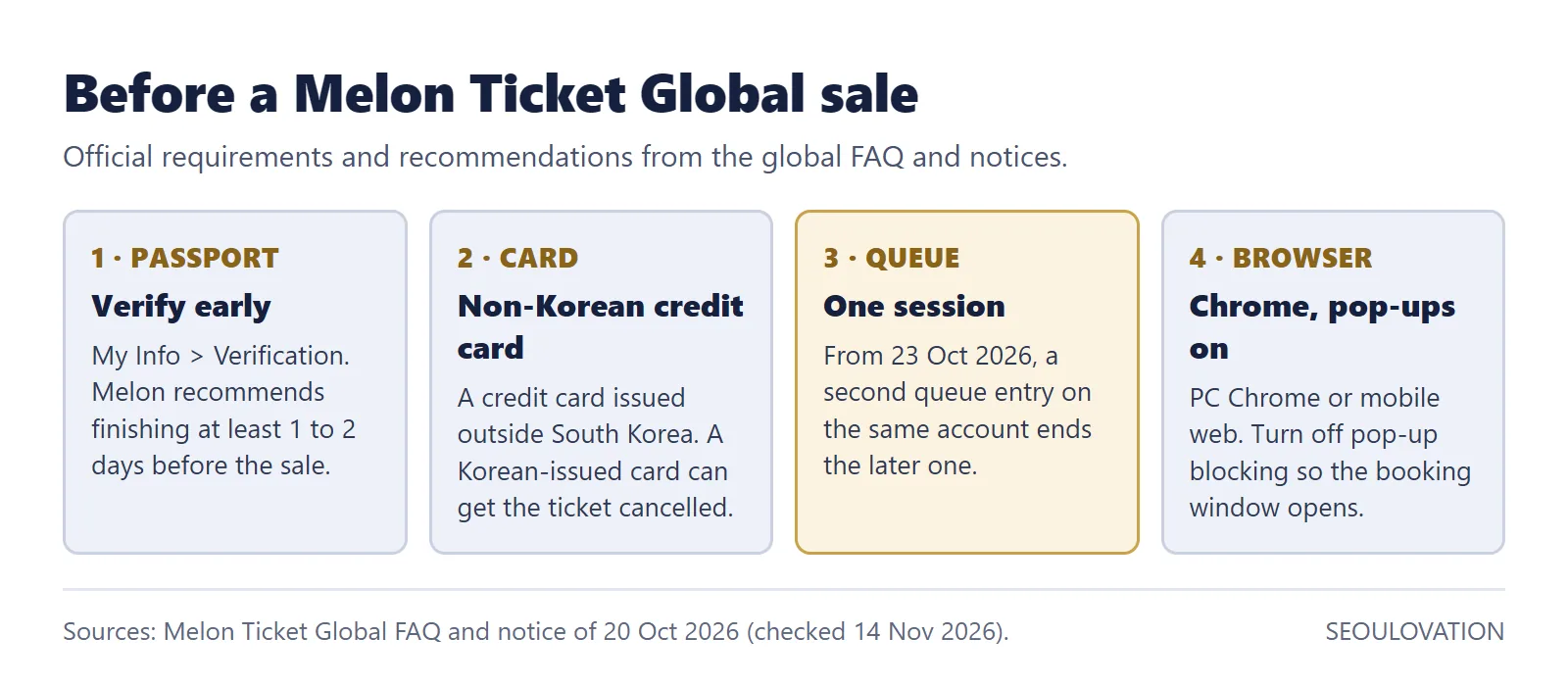
- "The reservation window may not open due to Chrome browser settings. Please disable pop-up blocking in advance."
The same FAQ, a few questions further down, still lists Firefox, Internet Explorer 10 and 11, and Safari. That answer reads like older text. When the two disagree, we would follow the first one: Chrome on a computer, or the mobile web.
What our test found (14 November 2026)
Between 11:30 and 12:05 KST we made three checks of tkglobal.melon.com and one command-line check of the Korean site, ticket.melon.com. The checks covered different pages and access methods, so read each line on its own.
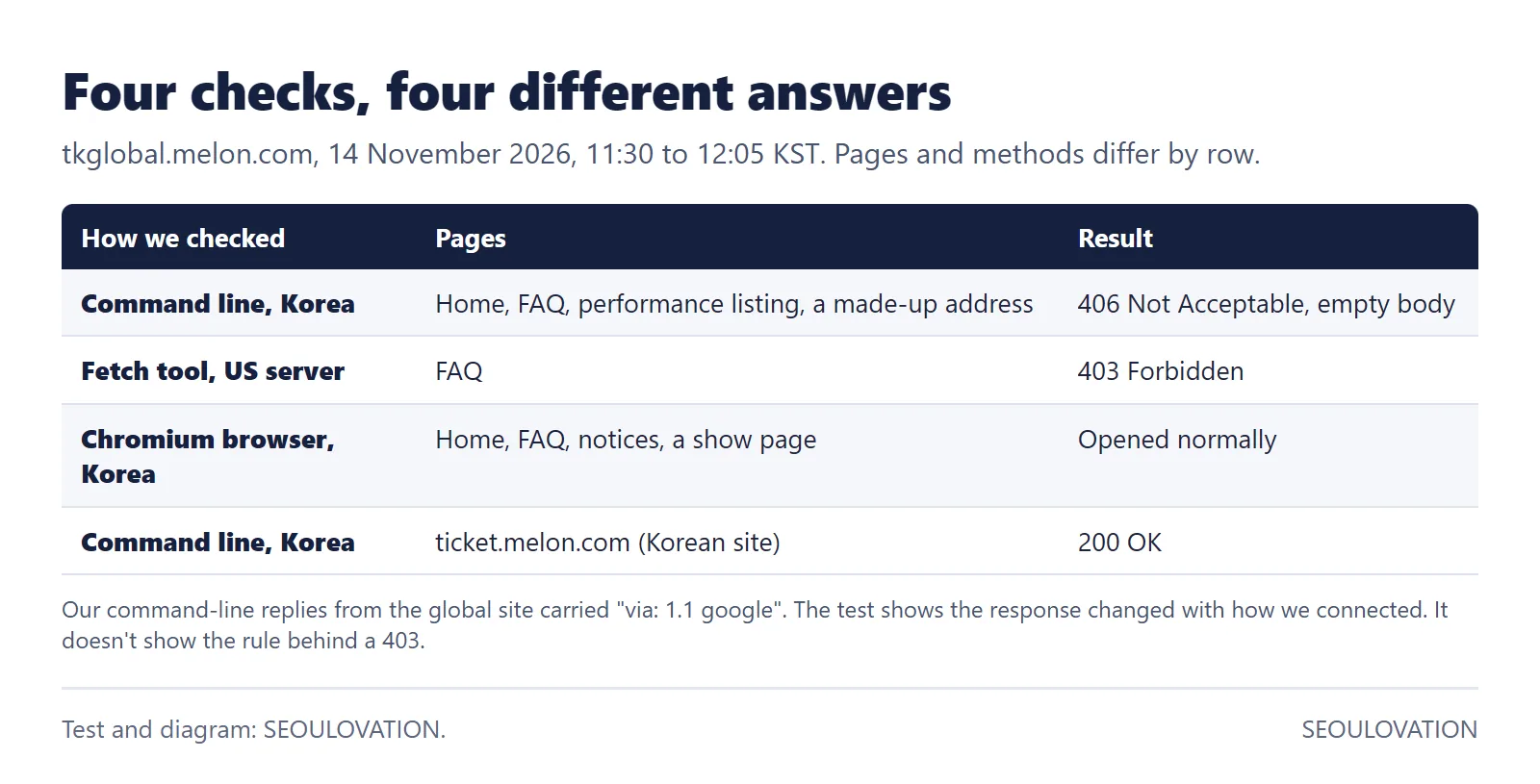
- Command-line request from a home connection in Korea: "406 Not Acceptable" with an empty page, for the home page, the FAQ, the performance listing and a made-up address. Adding a Chrome-like browser name to the request didn't change it.
- An automated fetch tool running on a US server: "403 Forbidden" on the FAQ page.
- A real Chromium browser on the same Korean connection: the home page, FAQ, notices and an NCT WISH show page all opened normally.
- The Korean site, ticket.melon.com, by command line: "200 OK". The domestic site did not turn the same request away.
Our command-line replies from the global site included the header "via: 1.1 google", and the address it resolved to is registered to Google. That suggests Google infrastructure sits in front of the site, but we can't see the rules it applies. What the test shows is narrower: from the same Korean connection, a command-line request was refused while a real browser loaded the pages. It doesn't identify the cause of a 403 abroad.
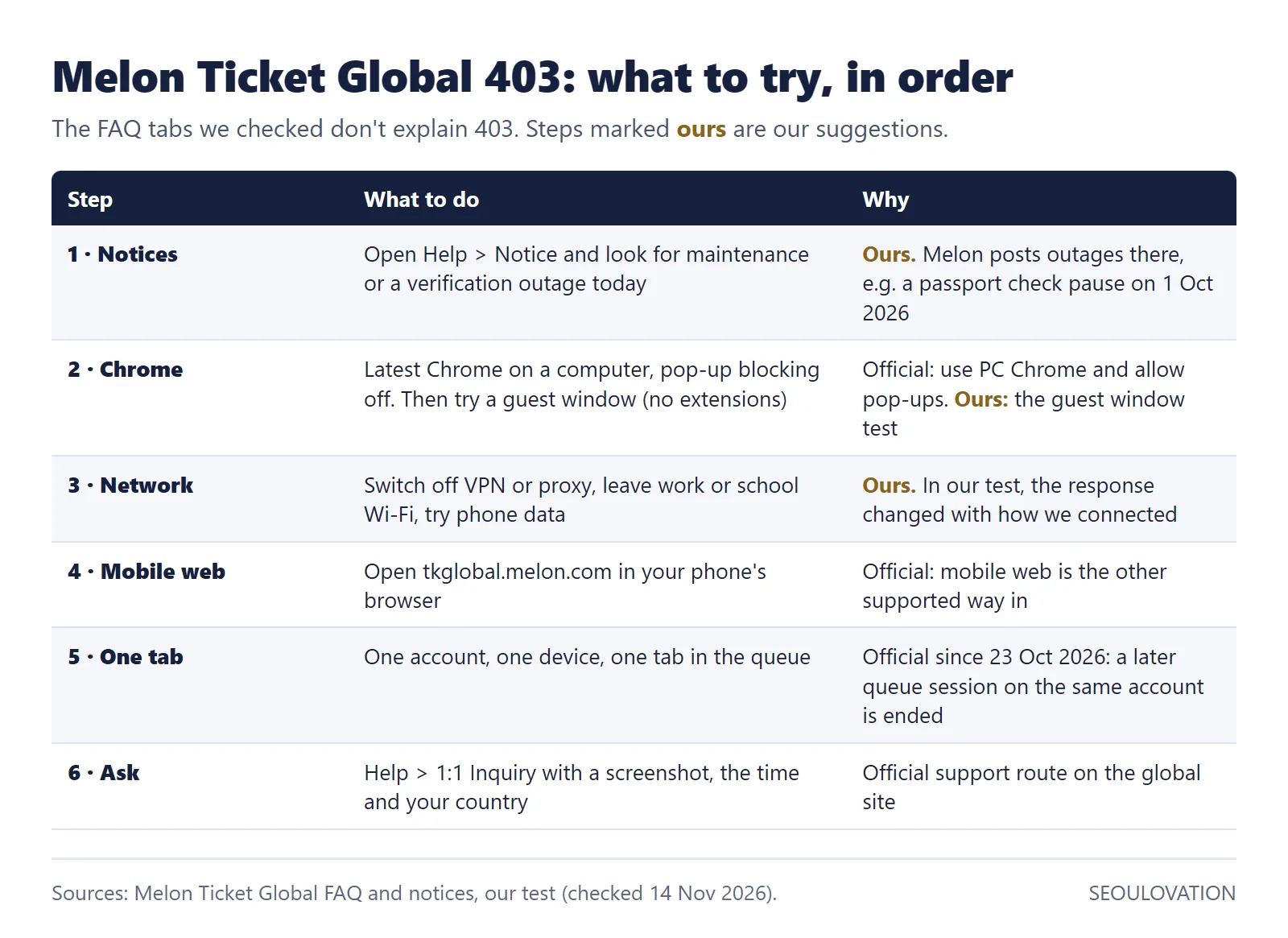
Our suggestion, not a Melon Ticket statement: rule out the things that change how your browser connects. That means extensions that change pages or requests, auto-refresh tools, and VPNs or proxies.
How do I fix 403 Forbidden on the home or login page?
- Check the notice board first. Go to Help, then Notice. Melon Ticket Global posts outages and maintenance there. For example, a "Notification of Disruption in Global Identity Verification" on 20 October 2025, fixed the next day, and a notice that passport authentication would be unavailable on 1 October 2026. If a notice covers the service and the time you are affected, follow its instructions.
- Use up-to-date Chrome with pop-ups allowed. This part is official: Melon Ticket optimizes for PC Chrome and asks you to disable pop-up blocking. Trying a guest window, which opens without your extensions, is our suggestion. If the page loads there, a setting, extension or saved data in your usual window may be involved, but that doesn't prove which one.
- Change the network. Switch off any VPN or proxy. Work, school and hotel Wi-Fi can route traffic through filters, so try your phone's mobile data as a hotspot. Our suggestion, not a Melon Ticket rule.
- Try the mobile web. Open tkglobal.melon.com in your phone's browser. Melon Ticket names mobile web as the other supported way in.
Melon Ticket Global not working when the queue opens?
On 20 October 2026 Melon Ticket Global posted a rule that took effect on 23 October: "Queue Numbers Limited to One Per Account. If you enter the queue simultaneously across multiple devices, browsers, or tabs using the same account, any queue session entered later will be automatically terminated."
The notice says "terminated", not "403", so we can't promise the two are linked. But if you had the sale open on a laptop, a phone and a second tab, the later sessions were going to be cut anyway. Keep one account in one tab on one device. The same notice says show dates and times appear on the show page one hour before the sale.
What if it still says 403 Forbidden?
Use the official support route: Help, then 1:1 Inquiry. The global FAQ doesn't list an email address or phone number, so the inquiry form is the channel. Include:
- a screenshot of the 403 page with the address bar visible,
- the date and time in KST,
- your country, your browser and version, and whether you were on Wi-Fi or mobile data,
- which steps above you already tried.
If a sale is minutes away, use a backup network you control, and keep only one active queue session on your own account.
Melon Ticket Global rules worth knowing before the sale
| Topic | What the global FAQ says |
|---|---|
| Who it is for | The footer says the global service is for foreigners living outside Korea. Users in Korea are asked to use the Korean service. |
| Passport check | My Info, then Verification, then scan your passport and face. Melon recommends finishing "at least 1–2 days in advance". |
| Card | A credit card issued outside South Korea. A Korean-issued card can get the ticket canceled. For advance purchases, the FAQ says only credit cards can be used. |
| Other payment | If you choose Alipay+ or PayPal at the final payment step, the FAQ says you are passed to that service. |
| Card statement | The charge shows as "KGINICIS", "BC Card" or similar, not "Melon Ticket". |
One live example from 14 November: the NCT WISH concert at Gocheok Sky Dome on 15 and 16 January 2027 is listed as "Verified Members Only", with an added-seat general sale that opened on 13 November at 8 PM KST. If you are booking a show like this, the passport check is the step to finish early.
What to do next
- Bookmark the Help, Notice page and check it before you start troubleshooting.
- Do a dry run the day before: plain Chrome, no VPN, logged in, passport verified, pop-ups allowed.
- On sale day, keep one account in one tab, with mobile data ready as your backup network.
Related guides
- Interpark Global Verification Failed? How to Fix It on NOL World (2026)
- YES24 Global Ticket Login and Verification Pending: Passport Name Rules (2026)
- How to Buy K-pop Concert Tickets in Korea as a Foreigner (2026)
Sources and checked date
Official pages checked 14 November 2026. The access test is our own measurement from one Korean home connection and one US server, and may not match every country or provider.
- Melon Ticket Global FAQ: browser, pop-ups, payment, card statement and identity verification (checked 14 November 2026).
- Melon Ticket Global notices: one queue number per account (posted 20 October 2026), verification outage and maintenance notices (checked 14 November 2026).
- Melon Ticket Global: NCT WISH 2nd concert tour in Seoul, Verified Members Only and sale dates (checked 14 November 2026).
- SEOULOVATION access test of tkglobal.melon.com and ticket.melon.com, 14 November 2026, 11:30 to 12:05 KST.
Written and checked by the SEOULOVATION team. We test what we can reach ourselves, quote official pages word for word, and mark our own suggestions as ours.
Cover photo: AI-generated image, made for SEOULOVATION. Not a real Melon Ticket screen.


Comments
Post a Comment